
File Structure
Naming Conventions, and Working Like a Studio
ANIMATION AND VFX CINEMATOGRAPHY
Drew Campbell
2/3/20264 min read


File Structure, Naming Conventions, and
Working Like a Studio
As our AVFX5103 module begins, one of the first technical foundations we explored was file naming, folder structure, and pipeline organisation. At first glance this might appear to be a purely administrative task, but it quickly became clear that these systems underpin every professional animation and VFX workflow. Without them, even strong creative work can become difficult to manage, review, or reuse.
This module places a strong emphasis on working practices that mirror real-world production environments. That means treating files, folders, and archives not as personal sketches, but as shared production assets that need to be readable, repeatable, and scalable.
Why File Naming Matters in Animation and VFX
In professional production, files rarely exist in isolation. Shots pass through multiple stages, are reviewed by different departments, and often return for revisions weeks or months later. A clear and consistent naming convention ensures that every file communicates essential information at a glance: what project it belongs to, which shot it relates to, what type of asset it is, and which version is current.
The lesson highlighted that incorrectly named files are often rejected outright in studio environments until they conform to the agreed convention. This reinforces the idea that naming is not personal preference, but part of a shared professional language
A generic filename such as video3cat offers no usable information. By contrast, a structured filename immediately situates the asset within the pipeline and reduces the risk of confusion or error later in production.
Understanding the Naming Convention Structure
The naming format introduced follows a clear hierarchy:
ProjectName_Shot/Sequence_Element_Version.FileType
For example:
• RSH_010_BG04_v002.mp4
• RSH_010_EL02_v003.exr
Each section of the filename performs a specific function. The project name anchors the asset, the shot or sequence number locates it within the edit, the element tag identifies its role (background, plate, element, reference), and the version number ensures changes are tracked without overwriting previous work.
What stood out to me here is how much decision-making is removed once a convention is in place. Rather than stopping to think about how to name a file, the structure guides the process automatically. This feels particularly important when working under time pressure or managing multiple shots simultaneously.
Fig. 1, illustrates the folder structure for the Catch of the Day project. This system ensures that all assets are organized by sequence and shot, and clearly labeled for easy access during production.
Folder Structure as a Production Safety Net
Correct file naming alone is not enough without a robust folder structure. The lesson stressed that a clear hierarchy prevents work from being misplaced and allows anyone joining the project to understand it quickly
The example structure groups assets by project, then sequence, then shot, with subfolders for renders, plates, elements, and references. This mirrors industry-standard pipelines and supports both live production and long-term archiving.
From an AVFX5103 perspective, this is especially relevant because this module focuses on asset acquisition, documentation, and continuity. Photographs, HDRIs, reference images, test footage, and notes all need to be stored in a way that makes them usable later during animation or compositing. A disciplined folder structure ensures that captured data remains valuable rather than becoming digital clutter.
Linking Organisation to the VFX Pipeline
The session also placed file organisation within the wider VFX pipeline, broken down into pre-production, production, and post-production, see Fig. 3. Research, storyboards, concept work, and previs all generate assets that need to be logged and retrieved efficiently as production progresses.
Seeing file naming as part of the pipeline reframed it for me. It is not just about tidiness, but about maintaining continuity between stages and ensuring that decisions made early in production are traceable later on. This directly supports the professional documentation and archival skills that AVFX5103 is designed to develop.
Reflection and Next Steps
This introduction has made me more conscious of how I treat my digital workspace. Moving forward, I want my projects to feel production-ready from the outset, even when working independently. By adopting consistent naming conventions and structured folders now, I am building habits that will scale as projects become more complex and collaborative.
My next step is to apply this system rigorously across all AVFX5103 practical work, particularly when capturing and logging physical assets. I also plan to align this structure with my Shot to Screen project so that assets can move cleanly between modules without reorganisation later.
Ultimately, this session reinforced that professionalism in animation and VFX is not only visible on screen—it begins in the unseen structure that supports the work.
Refrences
Donnelly, J. (2023). VFX-Pipeline-Diagram. [Online Image] massive.io. Available at: https://massive.io/wp-content/uploads/2023/01/VFX-Pipeline-Diagram.png [Accessed 3 Feb. 2026].
Campbell, D. (2026). Catch of the Day Folder Structure [Photoshop Image]. Created by the author.
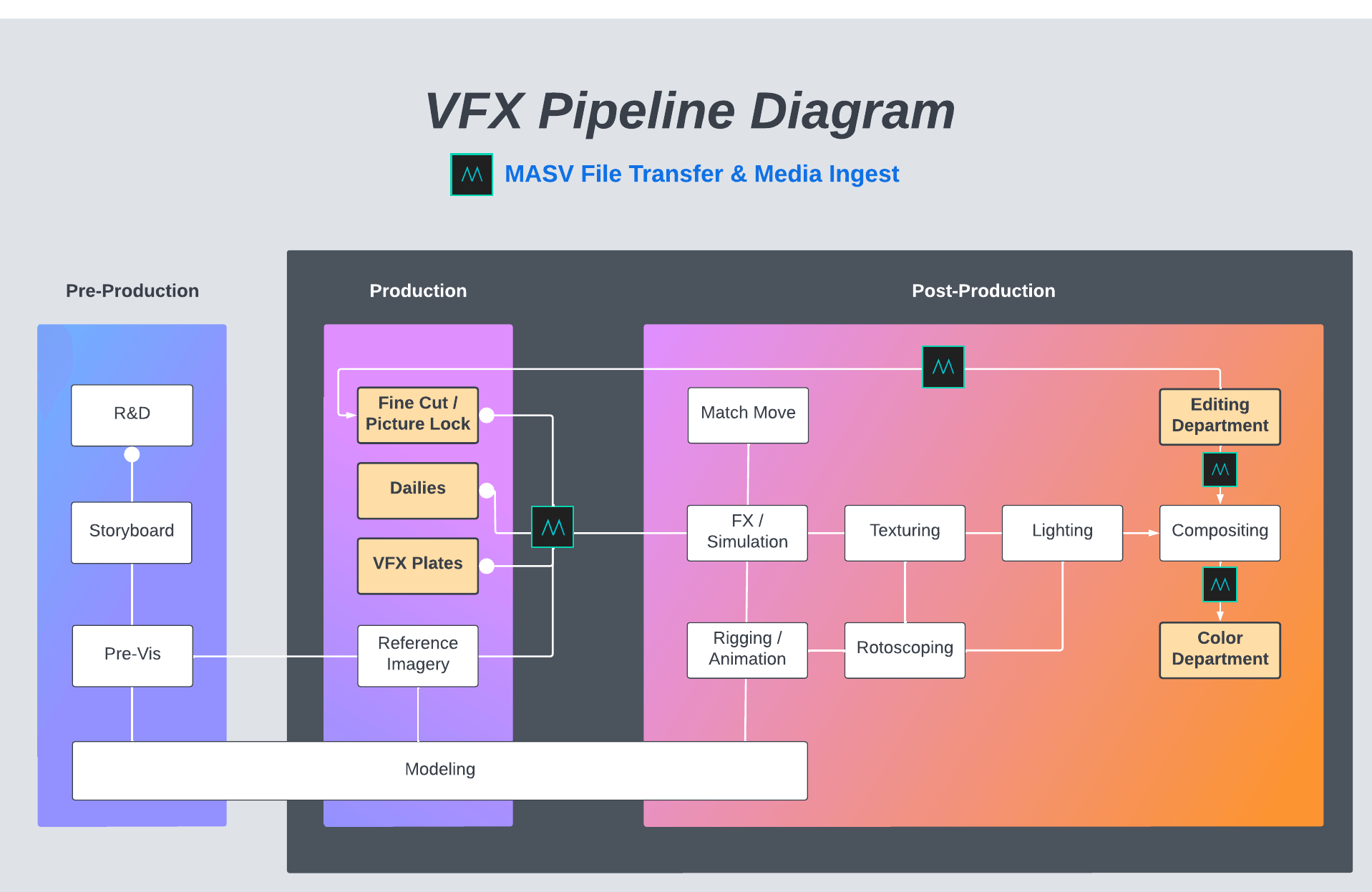
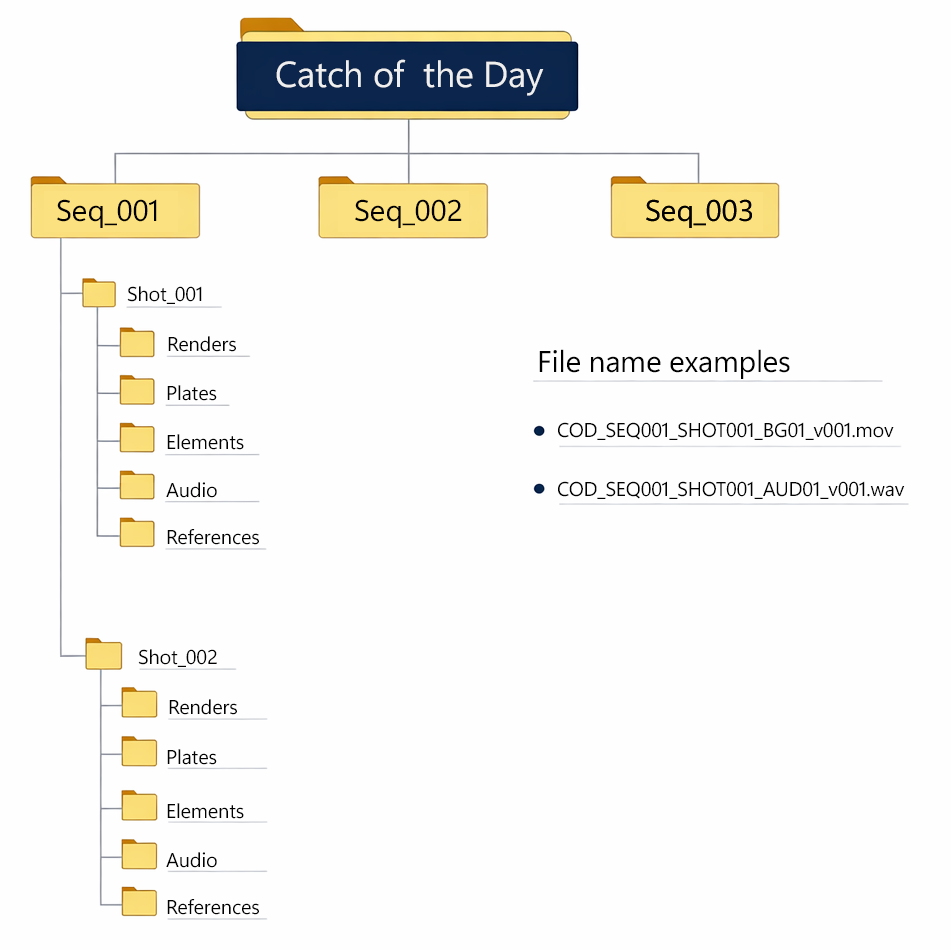
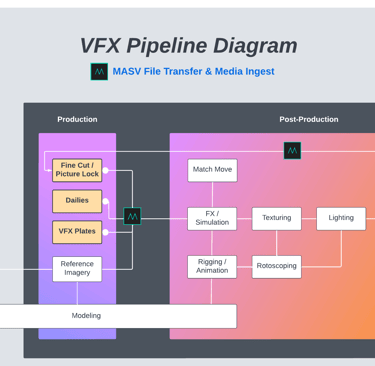
Fig. 1. Image created with FreePik imagage genorator.
Fig. 2. File system (Campbell, 2026)
Fig. 3. File system (Donnelly, 2023)
Business address: Voice of Drew, Carlisle, CA2 6ER | UTR: 7259771174 Copyright Drew Campbell 2024